User Flows help designers understand how users interact with a product or service, and how to create a better experience for them.
User Flows: Defining the Problem
User flows are an important part of the user experience design process.
They help designers understand how users interact with a product or service, and how to create a better experience for them.
Here are a few examples of user flows.
Signing up for an account
Enter email address → Create password → Confirm account
The first example is a flow for signing up for an account. The user starts by entering their email address, then they are asked to create a password. Once they have created a password, they are asked to confirm their account.
Making a purchase
Select item → Enter payment information → Confirm purchase
The second example is a flow for making a purchase. The user starts by selecting the item they want to buy, then they are asked to enter their payment information. Once they have entered their payment information, they are asked to confirm their purchase.
Getting Started
User flows are a visual representation of how a user interacts with a product or service. They are typically created as a flowchart, with each step in the process represented by a box.
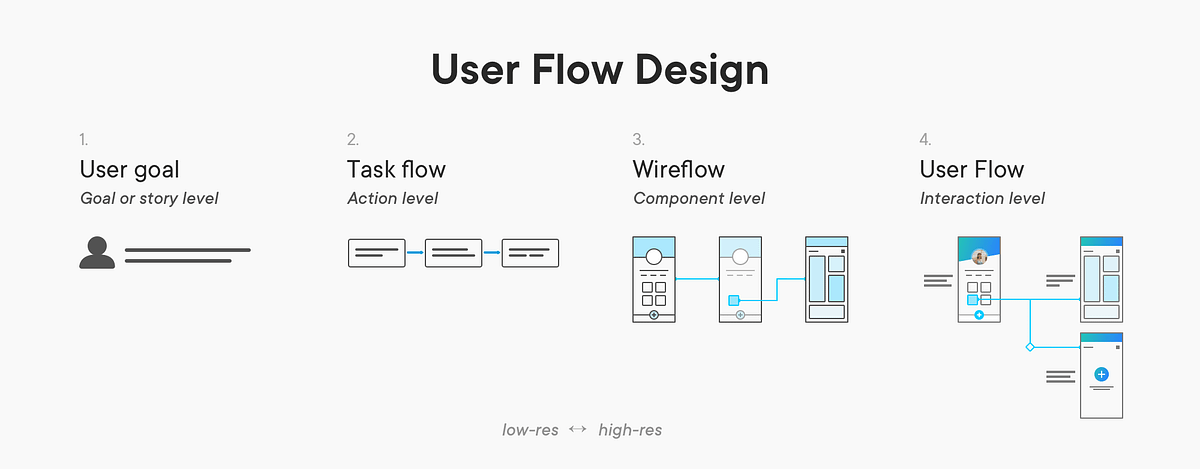
The boxes are connected by arrows, which show the order in which the user will take the steps.
User flows can be used to identify potential problems in the user experience, and to create solutions that make the experience better.
How To Create User Flows
Creating user flows is a straightforward process.
First, you’ll need to identify the user’s goal. This could be anything from signing up for an account to making a purchase. Once you have the goal in mind, you can start to map out the steps the user will take to reach that goal.
You’ll want to consider the user’s motivations, the actions they’ll take, and the decisions they’ll make along the way.
- Start by identifying the user’s goal.
- Map out the steps the user will take to reach that goal.
- Consider the user’s motivations, actions, and decisions.
- Create a flowchart to represent the user’s journey.
- Test the user flow to identify potential problems.
- Make changes to improve the user experience.
Best Practices
When creating user flows, there are a few best practices to keep in mind.
First, make sure to keep the user’s goal in mind throughout the process. This will help you create a flow that is intuitive and easy to follow.
Second, consider the user’s motivations and decisions. This will help you create a flow that is tailored to the user’s needs. Finally, test the user flow to identify potential problems and make changes to improve the user experience.
Popular User Experience (UX) platforms for designers
- InVision — Invision is a design collaboration and prototyping tool that helps teams create and share interactive prototypes of their designs.
- UsabilityHub — UsabilityHub’s user testing platform and research panel help you improve the UX of your apps and websites. Get feedback from real people. Sign up for free.
- UserZoom — UX research, done right. With UserZoom’s UX Insights System you can dig deeper, faster to deliver superior digital experiences throughout the product development lifecycle.
- Mockingbird — GoMockingbird is an online tool that helps you quickly create interactive wireframes and prototypes for websites and mobile apps. It’s easy to use and lets you collaborate with others in real-time.
- MockFlow — Online whiteboard for brainstorming user interfaces with your team
- Mockuuups Studio — Mockuuups is a platform that helps you create beautiful product mockups in seconds. It offers a wide range of customizable templates, from iPhone to Apple Watch, to help you showcase your designs.
- Userlytics — Leverage our state-of-the-art user research platform and global panel of more than 1.6 million to improve your customer and user experience.
- Fluid UI — Fluid UI is a web-based prototyping tool that helps you create interactive mobile and web prototypes quickly and easily. It has a drag-and-drop interface, a library of UI elements, and a range of collaboration features.
- UserTesting — Whether you’re focused on UI, UX Research, Design, or CX, with the UserTesting Platform you can get customer feedback to improve digital experiences and drive innovation
- Designer.io — Designer.io is a powerful design platform that helps teams create beautiful, high-quality designs quickly and easily. It offers a wide range of features, including drag-and-drop design, collaboration tools, and a library of templates and assets.
- UXPressia — UXPressia is a powerful customer experience mapping tool. Start customer journey mapping with UXPressia
- UXCam — UXCam is an experience analytics solution for mobile apps. Session replay, heatmaps, funnel analytics, and quantitative analytics make UXCam a complete enterprise analytics solution for deeply understanding user behavior. Book a short demo today.
- Mockplus — The all-in-one product design platform for prototyping, collaboration, and creating design systems. Mockplus helps you create better design experience faster and easier
- Userfeel.com — Pay as you go User Testing Tool with no subscription or monthly fees needed. Get better insights from our panel of high quality testers from just $30 per tester.
- Mouseflow — Customer experience analytics that unlock revenue opportunities. Bring your whole team (unlimited users) and record every user on every page.
- GrabCAD — The GrabCAD platform drives additive manufacturing at scale through connected solutions, including GrabCAD Print, GrabCAD Shop & the GrabCAD SDKs.
- Creately —
- UserReport — UserReport is a set of free, easy-to-use tools, that tell you who your users are, and what they want to achieve.
- Zeplin — Deliver on the promise of design
- Loyaltyworks — Online rewards and employee recognition platform makes creating your own incentive program simple, Dealer reward programs, Online rewards, Dealer incentives
- Engage UI — EngageUI is a platform that helps businesses create engaging, interactive experiences for their customers. It provides tools to create custom user interfaces, manage data, and track user engagement. It helps businesses create better customer experiences and increase customer loyalty.
- Axure RP — The most powerful way to plan, prototype and handoff to developers, all without code. Download a free trial and see why UX professionals choose Axure RP.
- UXtweak — Conduct qualitative UX study as your users complete specific tasks, directly on your live web. Try it for free now!
- Inspectlet — Inspectlet records videos of your visitors as they use your site, allowing you to see everything they do. See every mouse movement, scroll, click, and keypress on your site. Forget traditional analytics. You never need to wonder how exactly people are using your site again.
- Awwwards — Awwwards are the Website Awards that recognize and promote the talent and effort of the best developers, designers and web agencies in the world.
- Balsamiq — Balsamiq is the company behind Balsamiq Wireframes, the industry standard low-fidelity wireframing tool.
- Scroll Depth — ScrollDepth is a tool that helps you measure how far users scroll on your website. It tracks scroll events and provides detailed analytics to help you understand user engagement and optimize your website.
- Usabilla — Usabilla helps companies improve their user experience and increase their customer satisfaction by providing feedback tools that enable customers to easily provide feedback on their digital products.
- UserVoice — B2B user feedback software to help you listen to and guide your customers, prioritize product features that matter, and innovate efficiently.
- UsabilityTools — UX design is a process of creating products that provide meaningful and relevant experiences to users.